|
|
 |
 |
|
|
|
|
Good for the Environment. Easy and Safe for you. |
|
|
|
|
|
Switching your credit card statements from paper to electronic is very simple; a one-time process that will bring long-term convenience and safety. |
|
|
|
|
|
 |
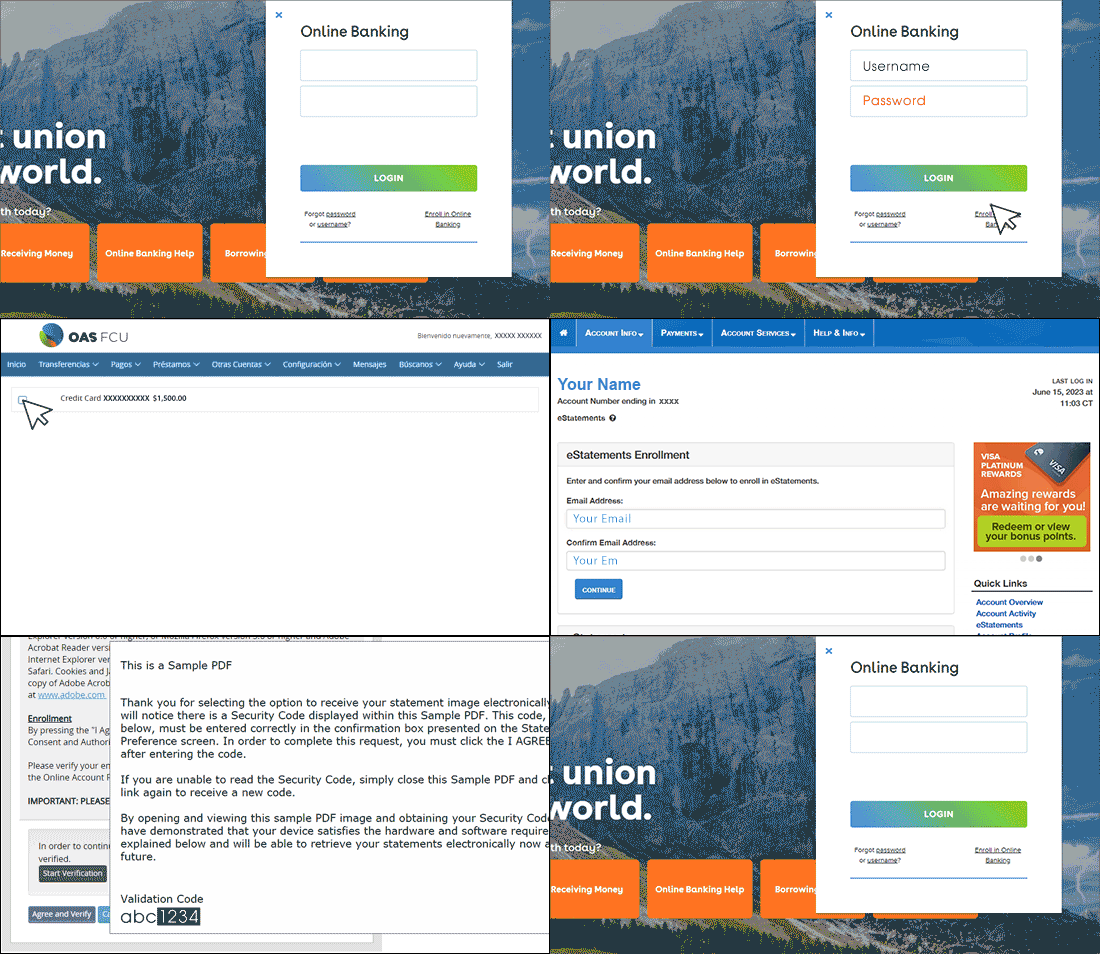
Log in to your OAS FCU Online Banking, got to the "Other Accounts" tab, and select "Manage my Credit Card (MyCardInfo)" option. On the screen, you'll find your card information. Select the checkbox next to it to access the MyCardInfo site.
|
 |
Once you're on the MyCardInfo page, select "Account Info" from the main menu, and within that menu, choose "eStatements."
|
 |
Within the "eStatement enrollment" box, enter your email address in the "Email Address" field as well as in the "Confirm Email Address" field, then press "Continue."
|
 |
Click on "Start verification." A PDF file with a verification code will open, which you'll need to copy and paste in the "Validation Code" box provided in the PDF.
|
 |
On the MyCardInfo screen, you'll see the list of available statements. To access the statement, click on the link corresponding to the date.
|
|
That's it! From now on, you'll be able to review your OAS FCU credit card statements online.
|
|
 |
|
|
|
|
|
|
|
|
 |
|
|
|
|
|
|
|
|
|
|
• This credit union is federally insured by the National Credit Union Administration.
• OAS FCU is an Equal Opportunity Lender. We do business in accordance with the Federal Fair Housing Law and the Equal Credit Opportunity Act.
• OAS FCU is committed to providing exceptional service to our Member-Owners, and to each other.
• As a financial cooperative, we are committed to the Seven Cooperative Principles. Please visit the National Credit Union Foundation’s website for more information.
|
|
|


